
P&ID Connectors: Connect and Review with OPC Manager
Find off-page connectors, choose source and target, and review drawing-to-drawing connections in the OPC Manager palette.
1. Open the palette and load connectors
- Open the P&ID project and a drawing you want to review.
- Choose OPC Manager on the ribbon, or run
PIDMANAGER. - Expand a drawing in the connector tree to inspect its OPCs. Choose Load All OPCs when your search must include connector data from every P&ID drawing.

Refresh rescans project OPC data. Config controls the columns shown in the connector tree.
2. Find the connector and inspect its status
- Search by tag, line number, drawing or connector number. Multiple search terms are combined with AND.
- Enable Unconnected only to hide OPCs that are already paired.
- Select a connector and read Connector Details: line, tag, drawing, status and connected partner.
- Review the drawing view to confirm that you have selected the intended connector.
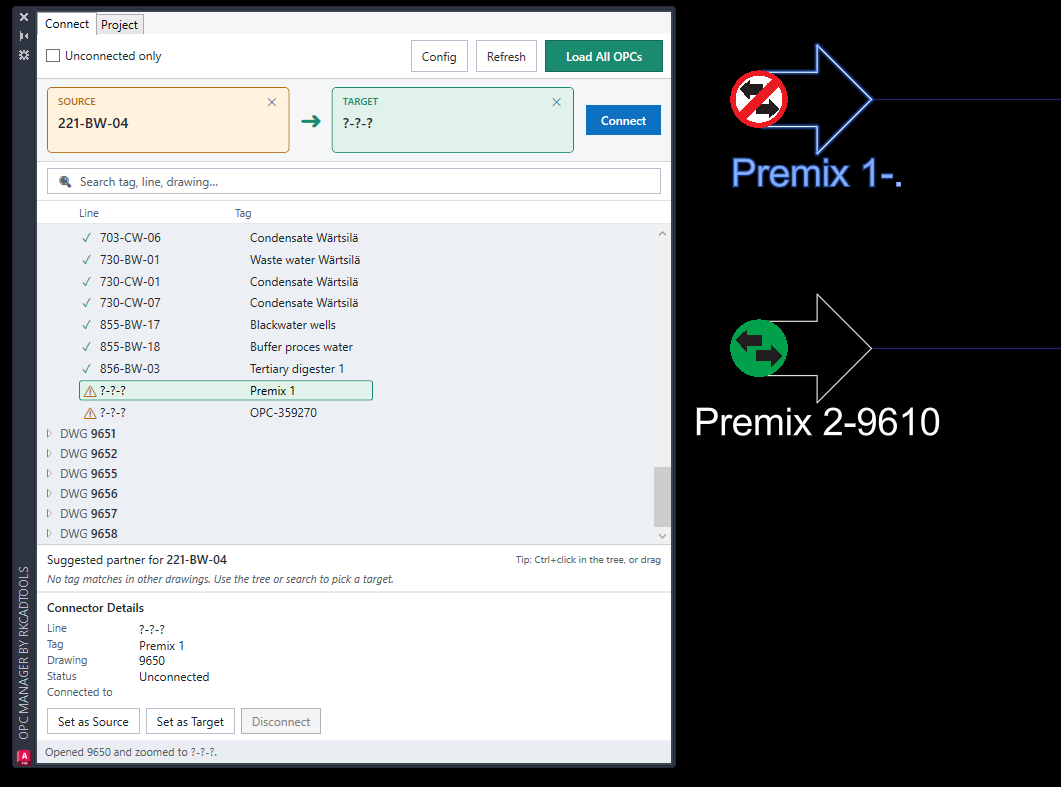
Check marks and warning symbols help identify connector status. Use the Details panel and drawing context to understand a warning before choosing a pair.
3. Set the source and target, then connect
- Select the intended source connector and choose Set as Source.
- Select the intended connector on another drawing and choose Set as Target. Use the tree or search when no suggested partner is available.
- Review both selected connectors, their line numbers and flow directions.
- Choose Connect, then read the status result and check the refreshed partner information.
- Save the affected drawings and check them in through the normal Plant workflow.
Both connectors must be unconnected and belong to different drawings. If both have complete line tags, the line numbers must match. Known flow directions must be counterparts. An incomplete target line in the screenshot is a prompt to review its context before connecting.
The affected drawings must be writable; check them out through your normal collaboration workflow when required.
4. Review an existing pair or the project network
Select a connected OPC and inspect Connected to before choosing Disconnect. The action is unavailable for the unconnected connector shown in the screenshot. Review the result and save the affected drawings.
Use OPC Overview (P3DOPCOVERVIEW or P3DOPC) to review drawing relationships and unconnected connector counts. Its Cluster Map provides a draggable view of the drawing network; open or zoom to a connector when a drawing needs attention.
Continue with the P&ID Connectors command reference, or use Tags Audit to inspect incomplete or duplicate tags.